World Monitor: GlobeAlert
- 4.8
- Rating
- 10.00K
- Installs
- Free
- Price
 Analysis by App-foxy
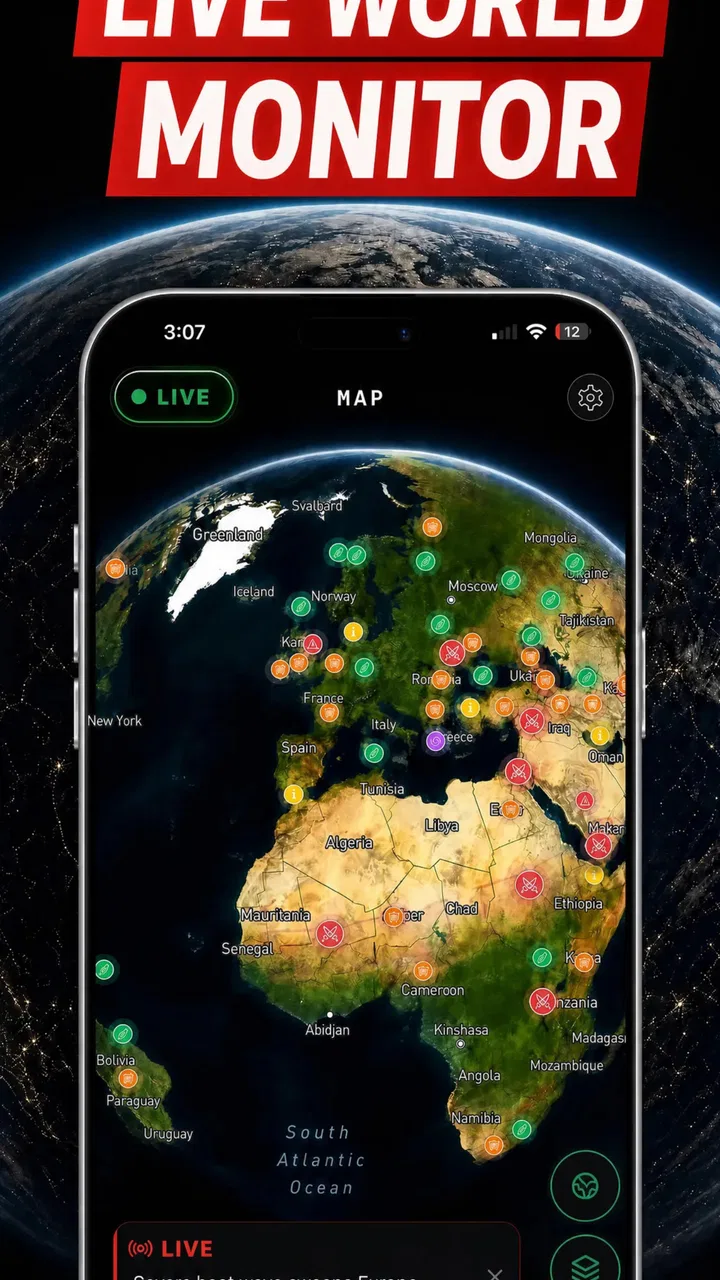
I found World Monitor: GlobeAlert most useful when I treated it as a fast visual briefing tool rather than a complete news service. Its focus is clear: it belongs to the News & Magazines category and presents itself as a live war tracker built around an OSINT map. That combination makes it appealing when I want to understand where a developing conflict is unfolding before I start opening multiple articles, but it also creates an important limitation: a map can show movement and location quickly without giving the full political, humanitarian, or historical context behind an event.
My overall view is positive, with a qualification. GlobeAlert is best for orientation, not final verification. I would recommend it to readers who follow international security, journalists who need a quick geographic starting point, students studying current affairs, and anyone who prefers seeing global events spatially. I would not use it as my only source for a serious decision, a detailed report, or a sensitive claim that needs confirmation from established reporting.
What World Monitor: GlobeAlert does well in everyday use
The first thing I noticed is how naturally a map changes the way I consume breaking news. Traditional news apps usually begin with headlines arranged in a feed. That works well when I already know which country or story I want to follow, but it can hide the relationship between separate events. A world map gives me a different starting point: I can look at a region, notice nearby activity, and then decide which subject deserves closer reading.
You May Also Like

 AccuWeather: Weather Radar
AccuWeather Review: A Quick, Clear Forecast for Everyday Decisions
For everyday plans, the best forecast is the one you can understand quickly. AccuWeather makes rain timing, radar, and local conditions easy to act on, with a few trade-offs.

 Hill Climb Racing
Why Hill Climb Racing Still Turns Crashes Into One More Run
A tiny car, a bumpy hill and one more upgrade: Hill Climb Racing keeps resurfacing because its simple chaos makes every near-miss feel personal.

 AliExpress - Shopping App
AliExpress Makes Global Shopping Feel Personal, but Shoppers Bear the Risk
AliExpress turns a global marketplace into a pocket-sized discovery engine. Its reach is useful, its shopping loop compelling, and its trade-offs easy to miss.

 Lords Mobile: Kingdom Wars
Lords Mobile Is a Kingdom-Building Routine, Not a Quick Match
A case-by-case verdict on the building, battles, device demands, and social commitments that make Lords Mobile rewarding for some players and exhausting for others.

 PDF Scanner app - TapScanner
TapScanner Makes Paperwork Easier to Capture, Check, and Share
TapScanner makes scanning with a phone feel less like a rescue operation and more like a dependable step in getting work done. Its capture tools are useful, though not flawless.

 Block Blast!
 Shows How Much a Puzzle Game Can Leave Out
A quiet grid game shows why puzzle players increasingly value instant clarity, repeatable skill and low-pressure play—and where the genre still needs to catch up.
More From Our News Desk
View All News


That makes the app particularly practical during a busy morning. Instead of jumping between several news sites, I can use GlobeAlert to establish a rough picture of what is happening around the world, then move to more detailed sources for the stories that matter to me. The visual approach reduces the initial effort of deciding where to begin. It is not just a list of alerts; it encourages geographic thinking.
The OSINT angle is also important. Open-source intelligence can be valuable because it brings together publicly observable information and presents it in a way that ordinary readers can follow. At the same time, OSINT requires discipline from the person using it. A marker on a map may indicate an event, a reported development, or a location connected with a wider situation, but the marker alone does not explain confidence, source quality, timing, or competing interpretations. I found the app more useful when I treated every item as a lead for further reading.
That habit is one of the app’s strongest practical lessons. I would open a location, note what the event appeared to concern, and then ask myself three questions: how recent is this, what exactly is being reported, and which independent source can add context? This workflow turns the app from a passive alert screen into a starting point for responsible research.
A useful companion during a developing story
Imagine receiving a message from a friend about a rapidly changing situation overseas while you are commuting or preparing for work. A conventional article may give you a headline, but you may still need to search for the country, neighboring areas, and related developments. GlobeAlert can help with that first orientation. I can glance at the map, identify the relevant area, and understand whether the story appears isolated or part of a broader regional pattern.
That does not mean the app replaces a newsroom. It means it shortens the distance between hearing about an event and understanding its approximate place in the world. For readers who regularly feel lost when international headlines mention unfamiliar cities or borders, this is a meaningful advantage.
I also appreciate the potential value for people who learn visually. Some readers remember a location more easily when they see it in relation to nearby countries, coastlines, or major regions. A map-based interface can make international news less abstract. It gives geography a role in the reading process instead of leaving location as a sentence buried beneath a headline.
Another non-obvious benefit is the ability to notice patterns without immediately committing to a conclusion. When I compare several nearby entries, I can form questions about escalation, proximity, or regional concentration. Those questions are more useful than rushing to declare a trend. The app works best when it helps me ask better questions, not when it tempts me to make a sweeping judgment from a quick glance.
Where it fits beside ordinary news apps
Compared with a standard newspaper app, World Monitor: GlobeAlert offers a more visual and geographically organized experience. A newspaper is usually better for interviews, timelines, analysis, and carefully edited explanations. GlobeAlert is better at giving me a broad situational snapshot. The two formats solve different problems, so I would use them together rather than choosing one as a universal replacement.
Compared with a general news aggregator, the app appears more focused on conflict and global security awareness. An aggregator may cover business, entertainment, local politics, weather, and technology in the same feed. That breadth is convenient, but it can make a major international development compete with dozens of unrelated stories. GlobeAlert’s narrower purpose can be an advantage for people who want to monitor world events without sorting through a general-purpose stream.
Compared with a dedicated security analyst’s newsletter or a long-form research platform, GlobeAlert is easier to scan but less suitable for deep interpretation. A specialist publication can explain actors, motives, historical disputes, and likely consequences in a way a map cannot. I would use the app to decide which subjects deserve that deeper reading, not to avoid the deeper reading entirely.
There is also a difference between speed and certainty. A visual tracker feels immediate, while a carefully reported article may take longer to read and may use more cautious language. That contrast matters. The app’s convenience is valuable, but I would resist treating a fast overview as more authoritative simply because it is easier to absorb.
The details that deserve a careful reading habit
The biggest weakness is not that the concept is wrong; it is that map-based information can appear more definite than it really is. A pin has visual authority. Once I see an event placed on a map, it is easy to assume the location, timing, and meaning are settled. In reality, conflict reporting often changes as witnesses, officials, analysts, and open sources provide new information.
For that reason, I would avoid sharing a screenshot from the app as if it were self-explanatory. If I were sending an update to a group chat, I would include the event’s wording and source context rather than only the map view. This is a small but important workflow improvement: preserve the uncertainty and explain what the item actually represents.
Another limitation is context density. A map can become crowded with information, especially when several developments occur in the same region. The more entries I try to absorb at once, the easier it becomes to confuse separate incidents or overestimate their connection. I find it more effective to choose one area, inspect it carefully, and then widen the view gradually.
Readers who want a calm, fully explained news experience may also find the subject matter demanding. A live war tracker naturally directs attention toward crises, instability, and urgent developments. That focus can be useful, but it may also encourage compulsive checking. I would set a specific purpose before opening it, such as checking a region once in the morning or researching one developing story, rather than leaving it open continuously.
The app should also be approached with emotional awareness. Conflict information is not merely data on a screen; it concerns real people and often includes distressing circumstances. A map can make events feel distant and abstract, while repeated alerts can create anxiety. I think the healthiest use is deliberate and time-limited, followed by fuller reading from responsible sources when a story genuinely matters.
Who should install it, and who should skip it
I see a strong fit for internationally minded readers who want a quick overview before reading detailed reporting. It is also suitable for students, researchers at the early stage of gathering material, and professionals who need to know which regions deserve attention. The map format may be especially helpful if ordinary headline feeds leave you unsure about where events are taking place.
It could be useful for a traveler or family member trying to understand a changing regional situation, but I would add a firm caution: do not use a general monitoring app as your only basis for travel, evacuation, or personal safety decisions. Those choices require current official guidance and reliable local information. GlobeAlert can help identify what to investigate, but it should not be treated as a substitute for direct safety instructions.
I would recommend skipping it if your main goal is local news, lifestyle coverage, entertainment, or comprehensive daily reporting across every subject. The app’s value comes from its international conflict-monitoring focus. Someone who wants sports scores, city events, financial updates, or a broad newspaper replacement will probably be better served by a conventional news application.
I would also hesitate to recommend it as a standalone tool for professional intelligence work. It may be a convenient first screen, but serious analysis needs documented sourcing, careful chronology, source evaluation, and a way to preserve evidence. The more consequential the decision, the more important it becomes to verify every meaningful detail elsewhere.
Practical questions about access and use
World Monitor: GlobeAlert is free to install, which makes it easy to try without committing money at the outset. The listing also includes in-app purchases ranging from around six dollars to around forty dollars per item. I would therefore check the purchase screen carefully before confirming anything and decide whether the free experience already covers my needs. For a casual reader, paying is not automatically necessary simply because optional purchases exist.
The app is marked for Everyone, so its age classification is broad rather than restricted to adults. That label should not be confused with the emotional suitability of every topic it may present. Parents and younger readers may still want to discuss how to interpret conflict reporting, distinguish a report from a confirmed fact, and take breaks from distressing coverage.
Compatibility is another practical consideration. The current version is 1.0.2 and requires Android 7.0 or later. That makes the app accessible on many older Android phones, although anyone using a device with an earlier system should check compatibility before planning around it. I would also keep the application updated, especially for a live information product where data presentation and reliability can matter as much as the interface.
The developer is Appricott Dijital Teknoliji ve Yazilim A.S., and the app has reached over ten thousand installs. Its average rating is 4.7 from around 1.4 thousand ratings, with around thirty reviews shown alongside that broader rating picture. Those figures suggest that early users generally respond well to the concept, but I would still judge it against my own needs because a strong average cannot answer whether the map is detailed enough for a particular research routine.
Three habits that make the app more reliable
My first recommendation is to use a two-stage reading process. Start with the map to identify the event and its geographic relationship to other developments. Then move to a trusted, detailed source before repeating the claim, making a decision, or drawing a conclusion. This preserves the app’s speed while reducing the risk of treating a visual summary as a complete account.
Second, keep a simple distinction between “located,” “reported,” and “understood.” An event can be placed on a map while its circumstances remain disputed. It can be widely reported while the consequences are still unclear. Separating those stages helps me avoid false confidence, especially when several alerts appear close together.
Third, use the map to build a reading queue rather than a doom-scrolling loop. I choose a small number of regions or stories, write down what I need to learn, and close the app once I have enough direction to continue elsewhere. This approach makes the product more useful for research and less likely to turn into endless refreshing.
A fourth habit is valuable for anyone sharing information: include the time and context of what you saw. A developing event can change quickly, and a bare screenshot may be misunderstood later. Even a short note explaining that the app helped locate a reported development, followed by a link or citation from a fuller source shared separately, is more responsible than presenting the map as definitive proof.
My final assessment
After using World Monitor: GlobeAlert as a monitoring companion, I think its central idea works. It gives international news a geographic shape, helps me orient myself quickly, and makes it easier to spot which regions deserve closer attention. The strongest experience comes when I have limited time but need a global snapshot before moving to deeper reporting.
Its weakness is inseparable from its strength. A fast, visual map is efficient, but efficiency can hide uncertainty and context. I would not rely on it alone for verification, safety decisions, or serious analysis. Readers who expect long explanations, broad lifestyle coverage, or a complete replacement for a newspaper may also find the focus too narrow.
The app is free to start, available for Everyone, and maintained by Appricott Dijital Teknoliji ve Yazilim A.S. The current Android release is 1.0.2, with support beginning at Android 7.0. Those practical details make it approachable for curious readers who want to test the format without immediately changing their entire news routine.
My recommendation is straightforward: install World Monitor: GlobeAlert if you want a visual first look at global conflict developments and are willing to verify important information through fuller sources. Skip it if you want a general news feed or a fully interpreted daily briefing. Used with that boundary in mind, World Monitor: GlobeAlert is a focused and useful starting point—quick for orientation, strongest as a companion, and not a replacement for careful journalism.
FAQs for World Monitor: GlobeAlert
01What is World Monitor: GlobeAlert used for?
World Monitor: GlobeAlert is designed to help users follow important events and developments around the world in one place. It can be useful for monitoring international news, security situations, natural disasters, political changes, and other major incidents. The app is aimed at people who want a quick overview of global activity rather than relying on several separate news and alert services.
02Does World Monitor: GlobeAlert provide real-time alerts?
The app is built around monitoring global events and may provide notifications or updated information when significant developments occur. However, the speed and availability of alerts can depend on internet connectivity, the selected topics or regions, notification permissions, and the app’s information sources. Users should not treat it as an official emergency-warning system and should verify urgent information with local authorities.
03Can I customize the countries, topics, or notifications I follow?
World Monitor: GlobeAlert may allow users to focus their experience on particular regions, event categories, or types of alerts, depending on the version installed and the features currently available. Customization is helpful because it can reduce irrelevant notifications and make the main screen easier to follow. After installation, review the settings carefully and enable only the alerts that are genuinely useful to you.
04Is the information in World Monitor: GlobeAlert reliable for emergencies?
The app can be a convenient way to discover and follow developing stories, but it should not be considered the only source during an emergency. Aggregated information may be delayed, incomplete, or presented without the full local context. For evacuation instructions, severe weather warnings, travel restrictions, or personal safety decisions, always compare the app’s information with official government agencies, emergency services, and trusted local news outlets.
05Does World Monitor: GlobeAlert require an internet connection, and is it free to use?
Because the app monitors changing global information, an internet connection is generally needed to load new content, refresh event details, and receive timely updates. Some basic features may be available without payment, while additional tools, fewer advertisements, or premium monitoring options could depend on the current release and subscription model. Check the Google Play Store or App Store listing for the latest pricing and in-app purchase details before downloading.
Pros
- Tracks global conflicts
- disasters
- and breaking events in one place.
- Interactive maps make worldwide developments easy to explore visually.
- Useful alerts help users stay informed about rapidly changing situations.
- Covers multiple regions instead of focusing on a single country.
- Clean interface supports quick checks of current global activity.
Cons
- Some alerts may feel alarming or overwhelming during major crises.
- Information quality depends on the accuracy and speed of data sources.
- Frequent updates can increase battery and mobile data usage.
- Limited context may require checking trusted news sources for full details.
- Certain advanced features or content may require a paid subscription.

World Monitor: GlobeAlert
Gallery